3.3 — Omitted Variable Bias

ECON 480 • Econometrics • Fall 2022

Dr. Ryan Safner
Associate Professor of Economics

safner@hood.edu
ryansafner/metricsF22
metricsF22.classes.ryansafner.com

Contents

Omitted Variables and Bias

The Multivariate Regression Model

Multivariate Regression in R

Omitted Variables and Bias

The Error Term

Yi=β0+β1Xi+ui

  • ui includes all other variables that affect Y

  • Every regression model always has omitted variables assumed in the error

    • Most are unobservable (hence “u”)
    • Examples: innate ability, weather at the time, etc
  • Again, we assume u is random, with E[u|X]=0 and var(u)=σ2u

  • Sometimes, omission of variables can bias OLS estimators (^β0 and ^β1)

Omitted Variable Bias I

  • Omitted variable bias (OVB) for some omitted variable Z exists if two conditions are met:

Omitted Variable Bias I

  • Omitted variable bias (OVB) for some omitted variable Z exists if two conditions are met:

1. Z is a determinant of Y

  • i.e. Z is in the error term, ui

Omitted Variable Bias I

  • Omitted variable bias (OVB) for some omitted variable Z exists if two conditions are met:

1. Z is a determinant of Y

  • i.e. Z is in the error term, ui

2. Z is correlated with the regressor X

  • i.e. cor(X,Z)≠0
  • implies cor(X,u)≠0
  • implies X is endogenous

Omitted Variable Bias II

  • Omitted variable bias makes X endogenous

  • Violates zero conditional mean assumption

E(ui|Xi)≠0⟹

  • knowing Xi tells you something about ui (i.e. something about Y not by way of X)!

Omitted Variable Bias III

  • ^β1 is biased: E[^β1]≠β1

  • ^β1 systematically over- or under-estimates the true relationship (β1)

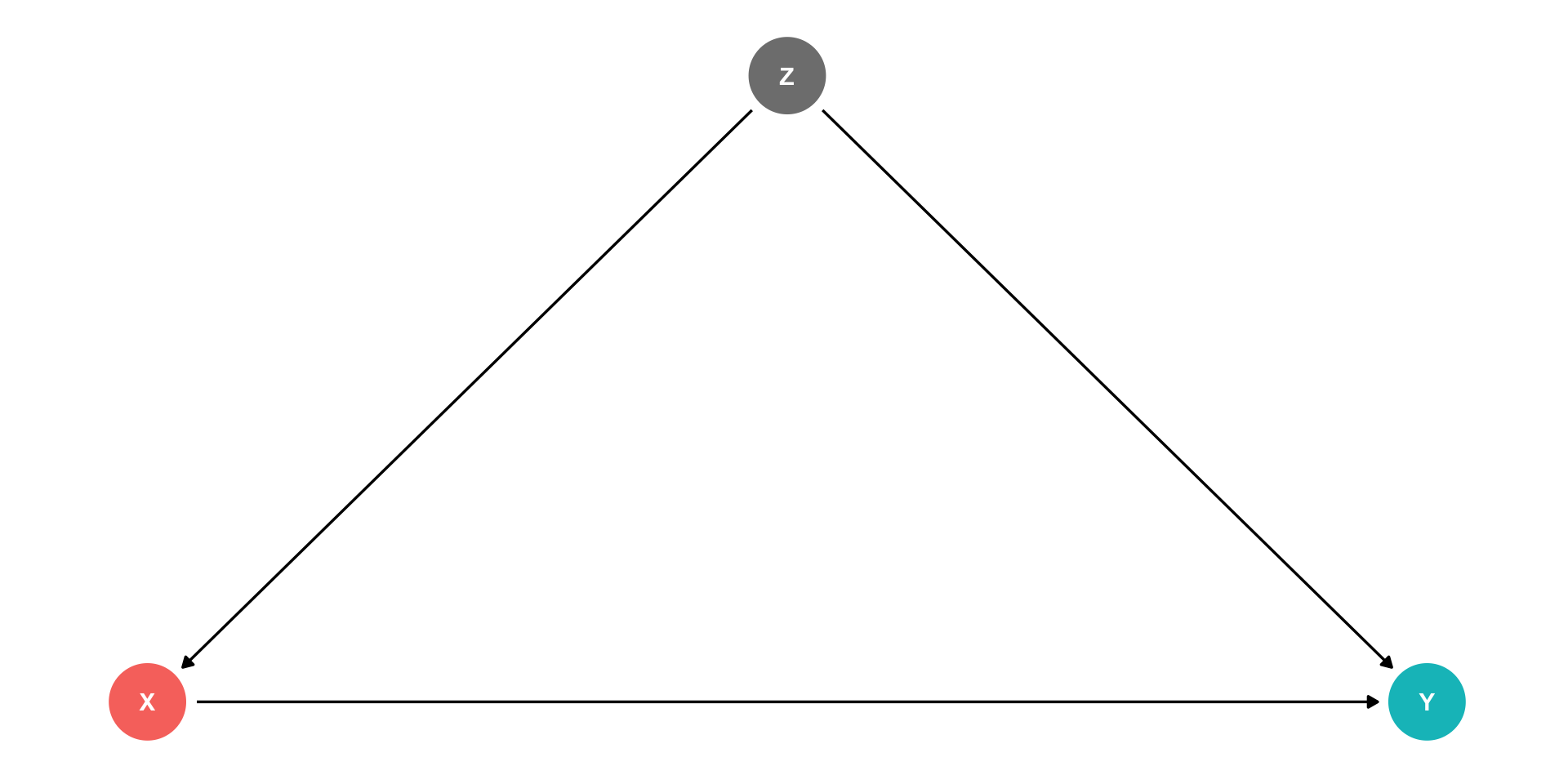
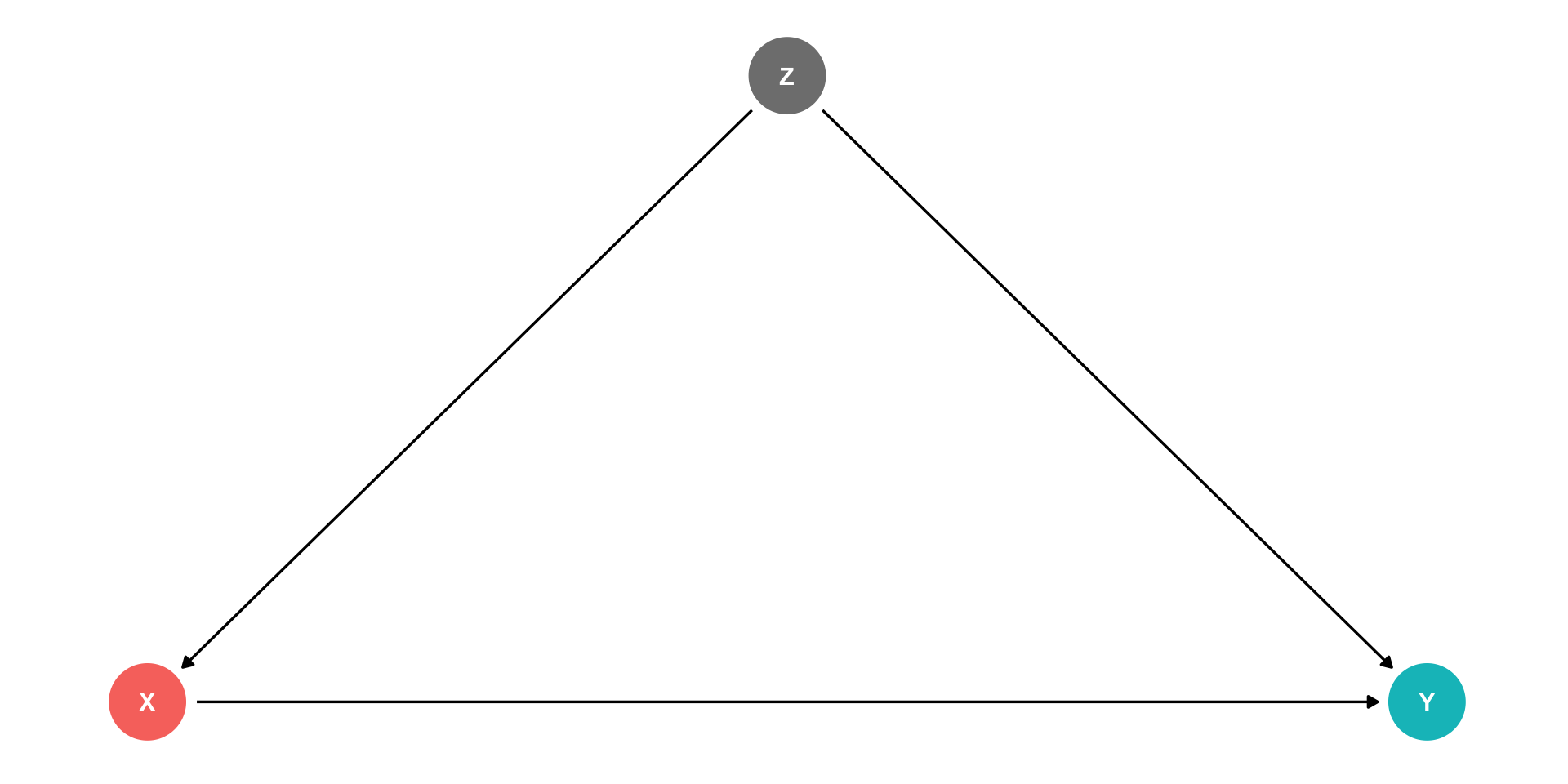
  • ^β1 “picks up” both pathways:

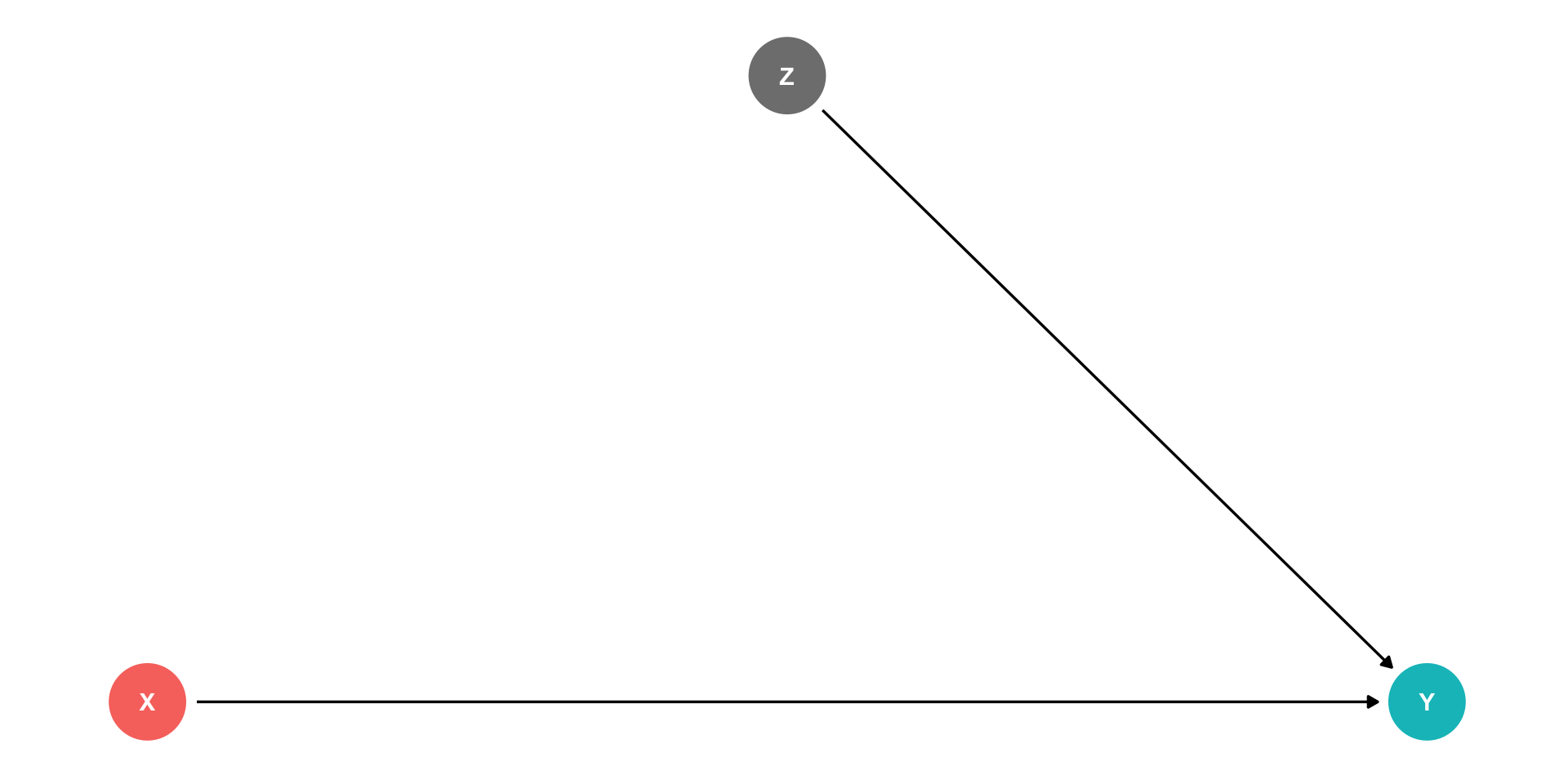
    1. X→Y
    2. X←Z→Y

Omited Variable Bias: Class Size Example

Example

Consider our recurring class size and test score example:

Test scorei=β0+β1STRi+ui

  • Which of the following possible variables would cause a bias if omitted?
  1. Zi: time of day of the test
  1. Zi: parking space per student
  1. Zi: percent of ESL students

Recall: Endogeneity and Bias

  • The true expected value of ^β1 is actually: [See class 2.4 for proof.]

E[^β1]=β1+cor(X,u)σuσX

  1. If X is exogenous: cor(X,u)=0, we’re just left with β1
  1. The larger cor(X,u) is, larger bias: (E[^β1]−β1)
  1. We can “sign” the direction of the bias based on cor(X,u)
  • Positive cor(X,u) overestimates the true β1 (^β1 is too high)
  • Negative cor(X,u) underestimates the true β1 (^β1 is too low)

Endogeneity and Bias: Correlations I

  • Here is where checking correlations between variables can help us:
ca_school %>%
  # Select only the three variables we want (there are many)
  select(str, testscr, el_pct) %>%
  # make a correlation table (all variables must be numeric)
  cor()
               str    testscr     el_pct
str      1.0000000 -0.2263628  0.1876424
testscr -0.2263628  1.0000000 -0.6441237
el_pct   0.1876424 -0.6441237  1.0000000
  • el_pct is strongly (negatively) correlated with testscr (Condition 1)

  • el_pct is reasonably (positively) correlated with str (Condition 2)

Look at Conditional Distributions I

# make a new variable called EL
# = high (if el_pct is above median) or = low (if below median)
ca_school <- ca_school %>% # next we create a new dummy variable called ESL
  mutate(ESL = ifelse(el_pct > median(el_pct), # test if ESL is above median
                     yes = "High ESL", # if yes, call this variable "High ESL"
                     no = "Low ESL")) # if no, call this variable "Low ESL"

# get average test score by high/low EL
ca_school %>%
  group_by(ESL) %>%
  summarize(Average_test_score = mean(testscr))
ABCDEFGHIJ0123456789
ESL
<chr>
Average_test_score
<dbl>
High ESL643.9591
Low ESL664.3540
2 rows

Look at Conditional Distributions II

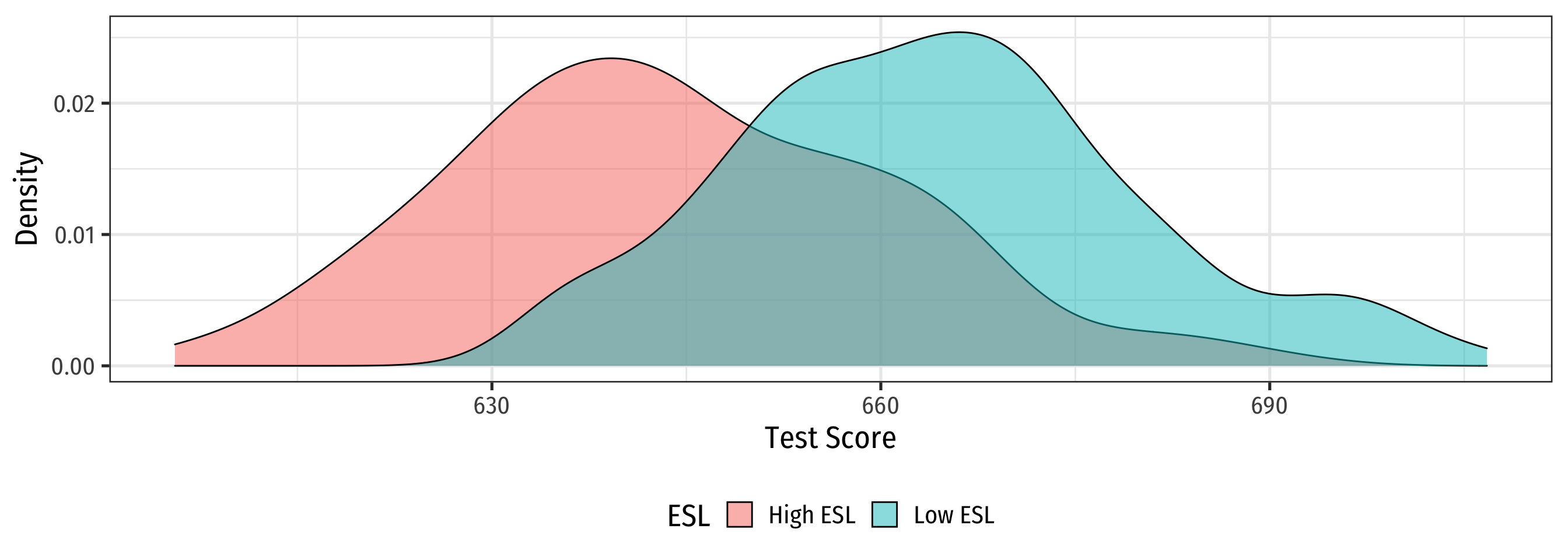
  • Plot
  • Code

ggplot(data = ca_school)+
  aes(x = testscr,
      fill = ESL)+
  geom_density(alpha = 0.5)+
  labs(x = "Test Score",
       y = "Density")+
  theme_bw(
    base_family = "Fira Sans Condensed",
    base_size=20
    )+
  theme(legend.position = "bottom")

Look at Conditional Distributions III

  • Plot
  • Code

esl_scatter <- ggplot(data = ca_school)+
  aes(x = str,
      y = testscr,
      color = ESL)+
  geom_point()+
  geom_smooth(method = "lm")+
  labs(x = "STR",
       y = "Test Score")+
  theme_bw(
    base_family = "Fira Sans Condensed",
    base_size=20
    )+
  theme(legend.position = "bottom")

esl_scatter

Look at Conditional Distributions IV

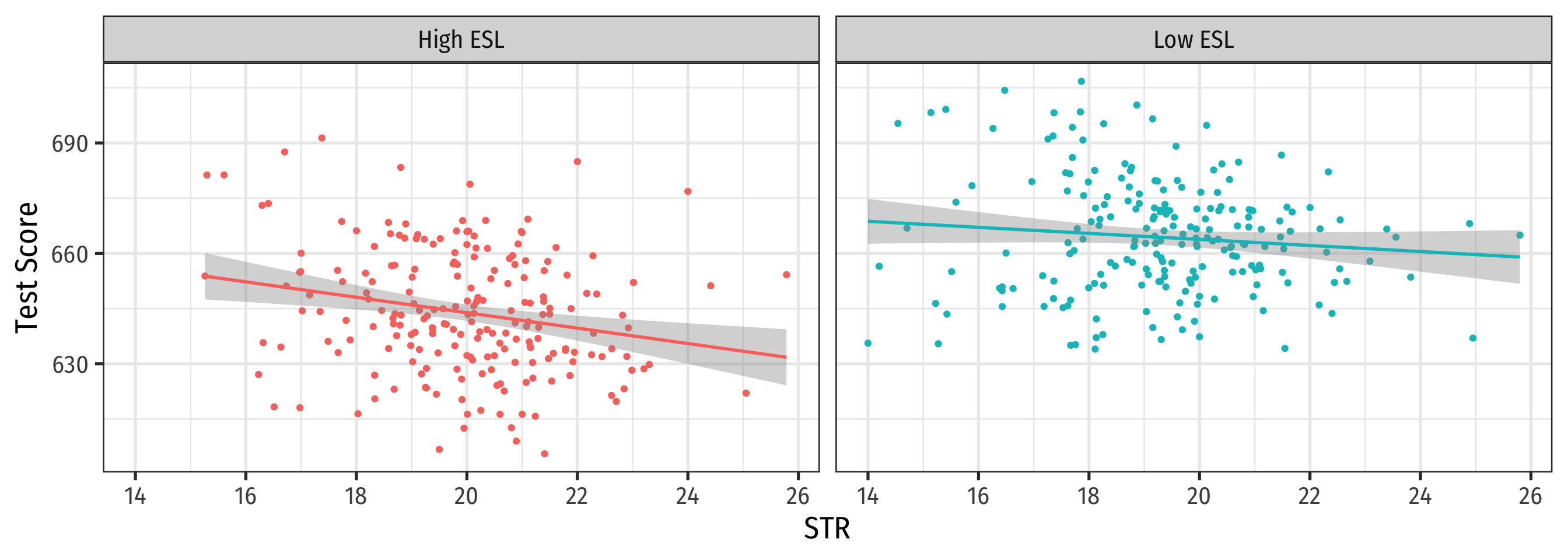
  • Plot
  • Code

esl_scatter+
  facet_grid(~ESL)+
  guides(color = F)

Omitted Variable Bias in the Class Size Example

E[^β1]=β1+bias

E[^β1]= β1 + cor(X,u) σuσX

  • cor(STR,u) is positive (via %EL)

  • cor(u,Test score) is negative (via %EL)

  • β1 is negative (between test score and str)

  • Bias from %EL is positive

    • Since β1 is negative, it’s made to be a larger negative number than it truly is
    • Implies that our ˆβ1 overstates the effect of reducing STR on improving Test Scores

Omitted Variable Bias: Messing with Causality I

  • If school districts with higher Test Scores happen to have both lower STR AND districts with smaller STR sizes tend to have less %EL …
  • How can we say ^β1 estimates the marginal effect of ΔSTR→ΔTest Score?
  • (We can’t.)

Omitted Variable Bias: Messing with Causality II

  • Consider an ideal random controlled trial (RCT)

  • Randomly assign experimental units (e.g. people, cities, etc) into two (or more) groups:

    • Treatment group(s): gets a (certain type or level of) treatment
    • Control group(s): gets no treatment(s)
  • Compare results of two groups to get average treatment effect

RCTs Neutralize Omitted Variable Bias I

Example

Imagine an ideal RCT for measuring the effect of STR on Test Score

  • School districts would be randomly assigned a student-teacher ratio

  • With random assignment, all factors in u (%ESL students, family size, parental income, years in the district, day of the week of the test, climate, etc) are distributed independently of class size

RCTs Neutralize Omitted Variable Bias II

Example

Imagine an ideal RCT for measuring the effect of STR on Test Score

  • Thus, cor(STR,u)=0 and E[u|STR]=0, i.e. exogeneity

  • Our ^β1 would be an unbiased estimate of β1, measuring the true causal effect of STR → Test Score

But We Rarely, if Ever, Can Do RCTs

  • But we didn’t run an RCT, we have observational data!

  • “Treatment” of having a large or small class size is NOT randomly assigned!

  • %EL: plausibly fits criteria of O.V. bias!

    1. %EL is a determinant of Test Score
    2. %EL is correlated with STR
  • Thus, “control” group and “treatment” group differ systematically!

    • Small STR also tend to have lower %EL; large STR also tend to have higher %EL
    • Selection bias: cor(STR,%EL)≠0, E[ui|STRi]≠0

Treatment Group

Control Group

Another Way to Control for Variables I

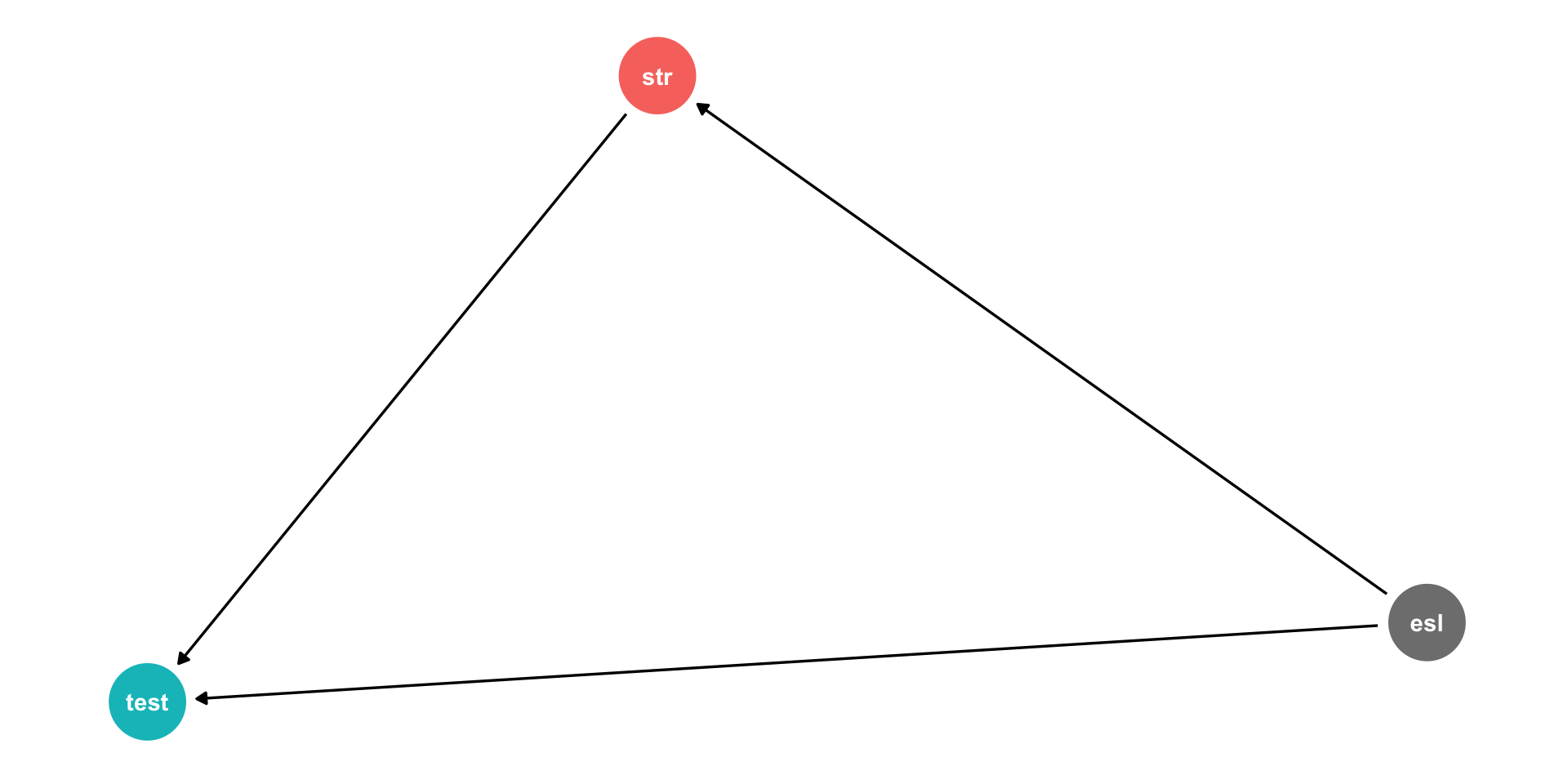
  • Pathways connecting str and test score:
    1. str → test score
    2. str ← ESL → testscore

Another Way to Control for Variables II

  • Pathways connecting str and test score:

    1. str → test score
    2. str ← ESL → testscore
  • DAG rules tell us we need to control for ESL in order to identify the causal effect of str → test score

  • So now, how do we control for a variable?

Controlling for Variables

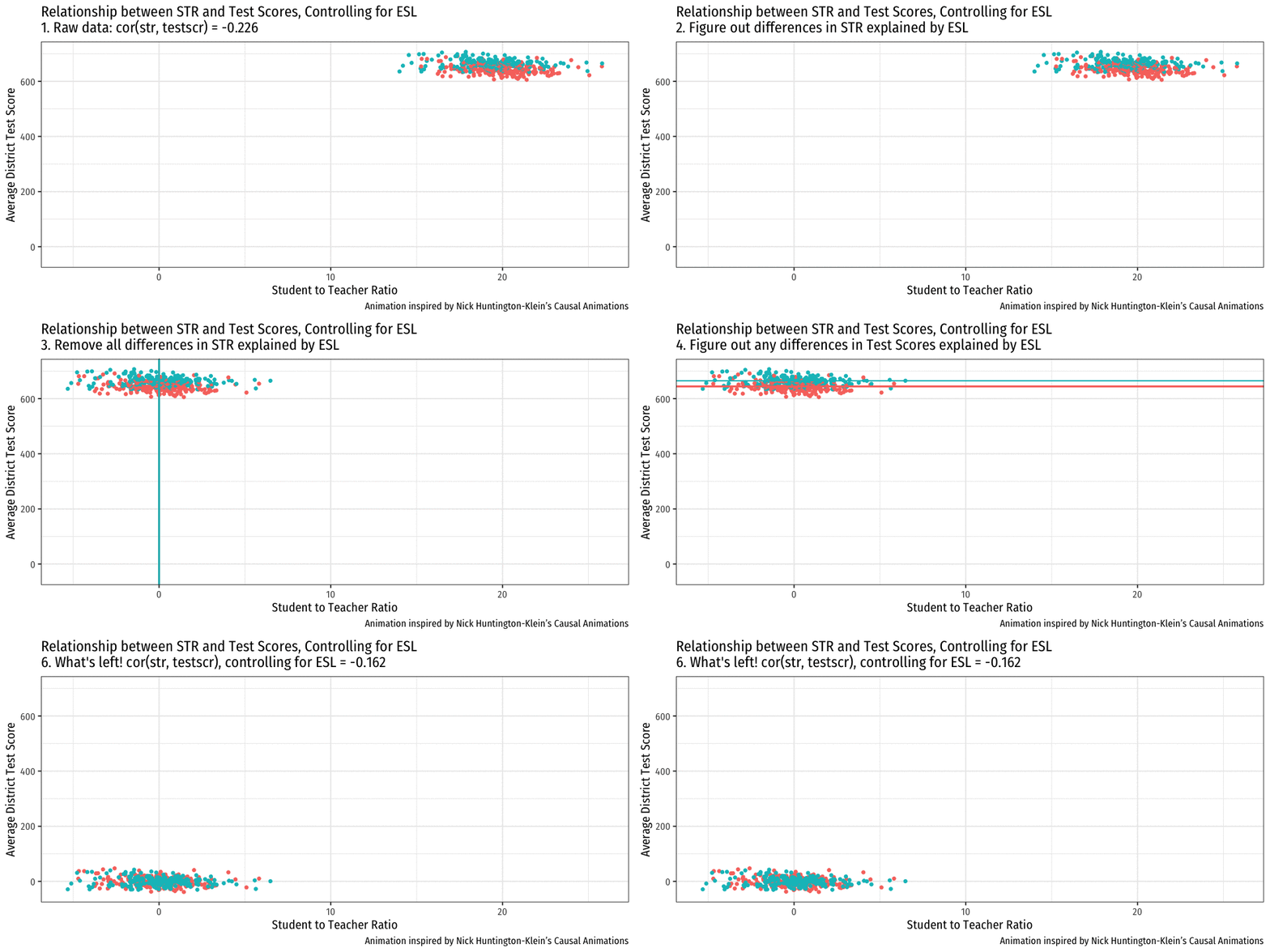
  • Look at effect of STR on Test Score by comparing districts with the same %EL
    • Eliminates differences in %EL between high and low STR classes
    • “As if” we had a control group! Hold %EL constant
  • The simple fix is just to not omit %EL!
    • Make it another independent variable on the righthand side of the regression
Treatment Group

Control Group

Controlling for Variables

  • Look at effect of STR on Test Score by comparing districts with the same %EL
    • Eliminates differences in %EL between high and low STR classes
    • “As if” we had a control group! Hold %EL constant
  • The simple fix is just to not omit %EL!
    • Make it another independent variable on the righthand side of the regression

The Multivariate Regression Model

Multivariate Econometric Models Overview

Y=β0+β1X1+β2X2+⋯+βkXk+u

  • Y is the dependent variable of interest
    • AKA “response variable,” “regressand,” “Left-hand side (LHS) variable”
  • X1,X2,⋯,Xk are independent variables
    • AKA “explanatory variables”, “regressors,” “Right-hand side (RHS) variables”, “covariates”
  • Our data consists of a spreadsheet of observed values of (Yi,X1i,X2i,⋯,Xki)

Multivariate Econometric Models: Overview II

Y=β0+β1X1+β2X2+⋯+βkXk+u

  • To model, we “regress Y on X1,X2,⋯,Xk”
  • β0,β1,β2,⋯,βk are parameters that describe the population relationships between the variables
    • unknown! to be estimated
    • we estimate k+1 parameters (“betas”) on k variables1
  • u is a random error term
    • ’U’nobservable, we can’t measure it, and must model with assumptions about it
  1. Note Bailey defines k to include both the number of variables plus the constant.

Marginal Effects I

Yi=β0+β1X1i+β2X2i+ui

  • Consider changing X1 by ΔX1 while holding X2 constant:

Y=β0+β1X1+β2X2Before the change

Marginal Effects I

Yi=β0+β1X1i+β2X2i+ui

  • Consider changing X1 by ΔX1 while holding X2 constant:

Y=β0+β1X1+β2X2Before the changeY+ΔY=β0+β1(X1+ΔX1)+β2X2After the change

Marginal Effects I

Yi=β0+β1X1i+β2X2i+ui

  • Consider changing X1 by ΔX1 while holding X2 constant:

Y=β0+β1X1+β2X2Before the changeY+ΔY=β0+β1(X1+ΔX1)+β2X2After the changeΔY=β1ΔX1The difference

Marginal Effects I

Yi=β0+β1X1i+β2X2i+ui

  • Consider changing X1 by ΔX1 while holding X2 constant:

Y=β0+β1X1+β2X2Before the changeY+ΔY=β0+β1(X1+ΔX1)+β2X2After the changeΔY=β1ΔX1The differenceΔYΔX1=β1Solving for β1

Marginal Effects II

β1=ΔYΔX1 holding X2 constant

Similarly, for β2:

β2=ΔYΔX2 holding X1 constant

And for the constant, β0:

β0=predicted value of Y when X1=0,X2=0

You Can Keep Your Intuitions…But They’re Wrong Now

  • We have been envisioning OLS regressions as the equation of a line through a scatterplot of data on two variables, X and Y
    • β0: “intercept”
    • β1: “slope”
  • With 3+ variables, OLS regression is no longer a “line” for us to estimate…

You Can Keep Your Intuitions…But They’re Wrong Now

  • We have been envisioning OLS regressions as the equation of a line through a scatterplot of data on two variables, X and Y
    • β0: “intercept”
    • β1: “slope”
  • With 3+ variables, OLS regression is no longer a “line” for us to estimate…
620640660testscr
plotly-logomark

The “Constant”

  • Alternatively, we can write the population regression equation as:

Yi=β0X0i+β1X1i+β2X2i+ui

  • Here, we added X0i to β0

  • X0i is a constant regressor, as we define X0i=1 for all i observations

  • Likewise, β0 is more generally called the “constant” term in the regression (instead of the “intercept”)

  • This may seem silly and trivial, but this will be useful next class!

The Population Regression Model: Example I

Example

Beer Consumptioni=β0+β1Pricei+β2Incomei+β3Nachos Pricei+β4Wine Price+ui

  • Let’s see what you remember from micro(econ)!
  • What measures the price effect? What sign should it have?
  • What measures the income effect? What sign should it have? What should inferior or normal (necessities & luxury) goods look like?
  • What measures the cross-price effect(s)? What sign should substitutes and complements have?

The Population Regression Model: Example II

Example

^Beer Consumptioni=20−1.5Pricei+1.25Incomei−0.75Nachos Pricei+1.3Wine Pricei

  • Interpret each ˆβ

The Multivariate Regression Model

Multivariate Regression in R

# run regression of testscr on str and el_pct
school_reg_2 <- lm(testscr ~ str + el_pct, 
                 data = ca_school)
  • Format for regression is
lm(y ~ x1 + x2, data = df)
  • y is dependent variable (listed first!)
  • ~ means “is modeled by” or “is explained by”
  • x1 and x2 are the independent variables
  • df is the dataframe where the data is stored

Multivariate Regression in R

# look at reg object
school_reg_2

Call:
lm(formula = testscr ~ str + el_pct, data = ca_school)

Coefficients:
(Intercept)          str       el_pct  
   686.0322      -1.1013      -0.6498  
  • Stored as an lm object called school_reg_2, a list object

Multivariate Regression in R

# get full summary
summary(school_reg_2)

Call:
lm(formula = testscr ~ str + el_pct, data = ca_school)

Residuals:
    Min      1Q  Median      3Q     Max 
-48.845 -10.240  -0.308   9.815  43.461 

Coefficients:
             Estimate Std. Error t value Pr(>|t|)    
(Intercept) 686.03225    7.41131  92.566  < 2e-16 ***
str          -1.10130    0.38028  -2.896  0.00398 ** 
el_pct       -0.64978    0.03934 -16.516  < 2e-16 ***
---
Signif. codes:  0 '***' 0.001 '**' 0.01 '*' 0.05 '.' 0.1 ' ' 1

Residual standard error: 14.46 on 417 degrees of freedom
Multiple R-squared:  0.4264,    Adjusted R-squared:  0.4237 
F-statistic:   155 on 2 and 417 DF,  p-value: < 2.2e-16
  • Stored as an lm object called school_reg_2, a list object

Multivariate Regression with Broom

  • The tidy() function creates a tidy tibble of regression output
# load packages
library(broom)

# tidy regression output
school_reg_2 %>% 
  tidy()
ABCDEFGHIJ0123456789
term
<chr>
estimate
<dbl>
std.error
<dbl>
statistic
<dbl>
p.value
<dbl>
(Intercept)686.03224877.4113124892.5655543.871501e-280
str-1.10129590.38027832-2.8960263.978056e-03
el_pct-0.64977680.03934255-16.5158791.657506e-47
3 rows

Multivariate Regression Output Table

# load package
library(modelsummary)

modelsummary(models = list("Test Score" = school_reg,
                           "Test Score" = school_reg_2),
             fmt = 2, # round to 2 decimals
             output = "html",
             coef_rename = c("(Intercept)" = "Constant",
                             "str" = "STR"),
             gof_map = list(
               list("raw" = "nobs", "clean" = "n", "fmt" = 0),
               list("raw" = "r.squared", "clean" = "R<sup>2</sup>", "fmt" = 2),
               list("raw" = "rmse", "clean" = "SER", "fmt" = 2)
             ),
             escape = FALSE,
             stars = c('*' = .1, '**' = .05, '***' = 0.01)
)
Test Score Test Score
Constant 698.93*** 686.03***
(9.47) (7.41)
STR −2.28*** −1.10***
(0.48) (0.38)
el_pct −0.65***
(0.04)
n 420 420
R2 0.05 0.43
SER 18.54 14.41
* p < 0.1, ** p < 0.05, *** p < 0.01

ECON 480 — Econometrics

1
3.3 — Omitted Variable Bias ECON 480 • Econometrics • Fall 2022 Dr. Ryan Safner Associate Professor of Economics safner@hood.edu ryansafner/metricsF22 metricsF22.classes.ryansafner.com

  1. Slides

  2. Tools

  3. Close
  • Title Slide
  • Contents
  • Omitted Variables and Bias
  • The Error Term
  • Omitted Variable Bias I
  • Omitted Variable Bias I
  • Omitted Variable Bias I
  • Omitted Variable Bias II
  • Omitted Variable Bias III
  • Omited Variable Bias: Class Size Example
  • Recall: Endogeneity and Bias
  • Endogeneity and Bias: Correlations I
  • Look at Conditional Distributions I
  • Look at Conditional Distributions II
  • Look at Conditional Distributions III
  • Look at Conditional Distributions IV
  • Omitted Variable Bias in the Class Size Example
  • Omitted Variable Bias: Messing with Causality I
  • Omitted Variable Bias: Messing with Causality II
  • RCTs Neutralize Omitted Variable Bias I
  • RCTs Neutralize Omitted Variable Bias II
  • But We Rarely, if Ever, Can Do RCTs
  • Another Way to Control for Variables I
  • Another Way to Control for Variables II
  • Controlling for Variables
  • Controlling for Variables
  • The Multivariate Regression Model
  • Multivariate Econometric Models Overview
  • Multivariate Econometric Models: Overview II
  • Marginal Effects I
  • Marginal Effects I
  • Marginal Effects I
  • Marginal Effects I
  • Marginal Effects II
  • You Can Keep Your Intuitions…But They’re Wrong Now
  • You Can Keep Your Intuitions…But They’re Wrong Now
  • The “Constant”
  • The Population Regression Model: Example I
  • The Population Regression Model: Example II
  • The Multivariate Regression Model
  • Multivariate Regression in R
  • Multivariate Regression in R
  • Multivariate Regression in R
  • Multivariate Regression with Broom
  • Multivariate Regression Output Table
  • f Fullscreen
  • s Speaker View
  • o Slide Overview
  • e PDF Export Mode
  • b Toggle Chalkboard
  • c Toggle Notes Canvas
  • d Download Drawings
  • ? Keyboard Help